
Notifications
Clear all

2021-06-13 6:14 pm
I do not know yet how, but will try to disconnect relay contacts from the Phase and output screw-terminal "N" from the Neutral, than reconnect "N" screw-terminal to second relay contact. It will free up relay contacts to control DC or non-120AC loads while Shelly 1PM itself receives power from 120VAC.
From my point of view if you have to butcher your Shelly as you say, then I would think the shelly in not the correct solution for you, especially as you have not demonstrated an in depth understanding of the product. So just some advice from someone who steers well clear of mucking about with mains voltages and would not like to see you fry your fingers or worse.
I wonder if a serial port can be used to drive an external relay
Again, I preface my remarks to say I don't know about the shelly1pm, but on the shelly1 if you are powering the shelly1 with mains voltage then be aware that some of the connection in the 'serial' connections will be at mains voltage.
I really don't think the Shellys should be hacked, but just used as intended being especially careful with mains voltage. The real use of Shellys is that they are easy to set up via their internal web Access Point and its made very easy to control them via their wireless connection to ones network via mqtt or http either from a shelly app, or from a program you construct that runs on whatever computer or microcontroller you are using for your project. If the shelly does not fit the project then I would go for a solution based on wiring up relays and making sure to design my enclosures so that any hight voltages or currents are well protected against accidental contact.
Just my opinion, and good luck with your project.

2021-06-13 11:15 pm
I really don't think the Shellys should be hacked, but just used as intended being especially careful with mains voltage.
Just my opinion, and good luck with your project.
Byron has a _very_ important point. Three years ago we lost our house to an electrical fire (roof leak inside wall to outlets in my daughter's bedroom)! Only the cat died, all four humans and dog got out/were out. We were at school/work. So not even a chance to fight and contain the damage... And that could happen with bad electronics on mains power at any time. Everyone might be sleeping...
Even if it is "just" property damage, such modifications would invalidate any UL certifications. And that would give the insurance company the right to refuse to cover you for _anything_!

Topic starter
2021-06-14 12:09 am
I'm sorry you lost your house. It was terrible. What happed to you makes me think twice before installing switch inside box or wall cavity. That is why I was considering Shelly 1PM with overheating protection to start with. If I decide to use Shelly 1PM with relay contacts separated from AC line, I might use a separate ESP8266 dedicated to detect and alarm dangerous condition.
I'm still trying to gather information about Shelly 1PM serial port used to connect battery operated Temperature sensor. It can be use for additional overheating control and possibly to control an external relay. Thanks for help.
This post was modified 3 years ago by roman47
2021-06-14 12:26 am
I'm sorry you lost your house. It was terrible. What happed to you makes me think twice before installing switch inside box or wall cavity. That is why I was considering Shelly 1PM with overheating protection to start with. If I decide to use Shelly 1PM with relay contacts separated from AC line, I might use a separate ESP8266 dedicated to detect and alarm dangerous condition. Thanks for help.
Not to tell you what to do, just sharing in the sound advice of others.
_DEFINITELY_ check building codes. They are not government trying to interfere--but government trying to keep us safe, by enforcing _minimum_ "best practices."
Never should you ever consider putting commercial or custom electronics directly into the wall cavities. In ceilings, they even have books of discussion about the dangers of "plenum" spaces. Always enclose the electrical stuff in purpose-built boxes for safety. Fingers & shocks....wire movement & shorts....fire retardation...
You'll notice that some of the Z-Wave/Zigbee wall switches even have to "cheat" the esthetics by exposing airflow & parts through the faceplates. And they _strongly_ recommend placing them in metal wallboxes, with matching metal cable retainers. Even when UL tested, in-wall is an environment to take super-seriously.
As others have said....absolutely _not_ to scare you off....just to recommend you research enough to have an outstanding result (in a good way)....something to be safe & proud of.
Topic starter
2021-06-14 12:45 am
I'm sorry you lost your house. It was terrible. What happed to you makes me think twice before installing switch inside box or wall cavity. That is why I was considering Shelly 1PM with overheating protection to start with. If I decide to use Shelly 1PM with relay contacts separated from AC line, I might use a separate ESP8266 dedicated to detect and alarm dangerous condition. Thanks for help.
Not to tell you what to do, just sharing in the sound advice of others.
_DEFINITELY_ check building codes. They are not government trying to interfere--but government trying to keep us safe, by enforcing _minimum_ "best practices."
Never should you ever consider putting commercial or custom electronics directly into the wall cavities. In ceilings, they even have books of discussion about the dangers of "plenum" spaces. Always enclose the electrical stuff in purpose-built boxes for safety. Fingers & shocks....wire movement & shorts....fire retardation...
You'll notice that some of the Z-Wave/Zigbee wall switches even have to "cheat" the esthetics by exposing airflow & parts through the faceplates. And they _strongly_ recommend placing them in metal wallboxes, with matching metal cable retainers. Even when UL tested, in-wall is an environment to take super-seriously.
As others have said....absolutely _not_ to scare you off....just to recommend you research enough to have an outstanding result (in a good way)....something to be safe & proud of.
I totaly agree and leaned a lot. Thank you so much for your advice.


2021-06-14 12:32 pm
That is why I was considering Shelly 1PM with overheating protection to start with. If I decide to use Shelly 1PM with relay contacts separated from AC line, I might use a separate ESP8266 dedicated to detect and alarm dangerous condition.
What exactly are you trying to do? From the information you provided, it sounds like the shelly 1pm will do everything you want. It has a wifi and button switch and it has temperature monitoring(and current monitoring). You can connect anything beyond the switch that you want to turn off and on.
I'm still trying to gather information about Shelly 1PM serial port used to connect battery operated Temperature sensor. It can be use for additional overheating control and possibly to control an external relay.
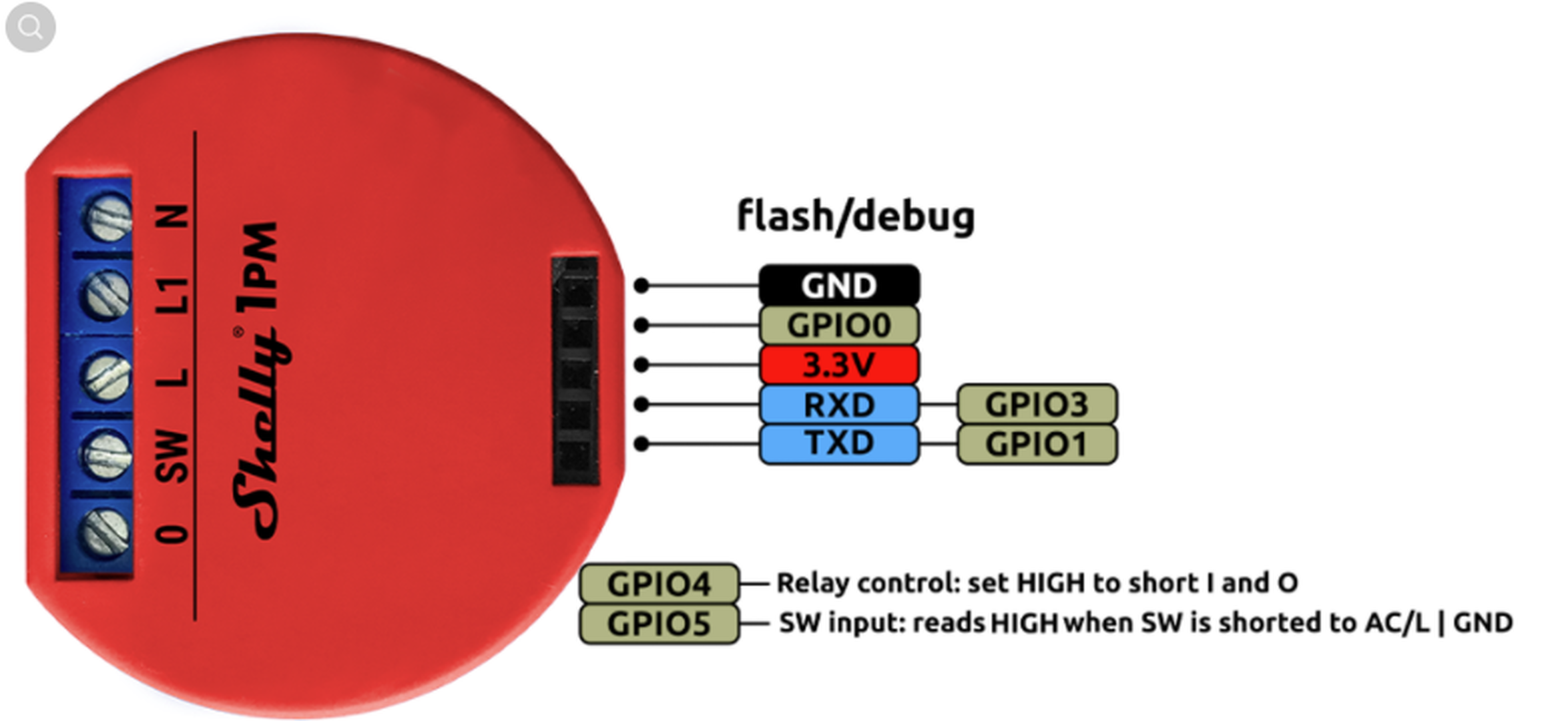
The 3.3V pin is to power the shelly to program it with your custom code. It is for power in(and when no power is supplies to the device, it should always be flashes when disconnected) only. There is also a warning for the GPIOs as well: "DO NOT CONNECT ANYTHING TO ANY GPIOs OF THESE DEVICES!!! (No sensors, no switches, nothing)". That was from the Tasmota Github.
I will also not that the pin terminals are meant to the connected to a proper power cable. It is not often stated but it really isn't intended for direct mains connection, not to mention in most places that would also require a licensed electrician to install(with very few caveats). Plugs are in a way, a safety device. If something goes wrong it could possibly disconnect itself(I was trained as an electrician to never tape over cable connections so that it has a chance of failing safe).
Also, I was rather disappointed with their website and what info they provide. But I did find a reseller that did their homework and they do a better job at displaying that vital info. https://smarterhome.sk/en/shelly/shelly-1pm-relay-switch-with-power-metering-1x-16a-wifi-738.html
I also found this there that might interest you.
https://smarterhome.sk/en/shelly/shelly-temperature-sensor-addon-for-shelly-11pm-744.html
Topic starter
2021-06-14 1:58 pm
That is why I was considering Shelly 1PM with overheating protection to start with. If I decide to use Shelly 1PM with relay contacts separated from AC line, I might use a separate ESP8266 dedicated to detect and alarm dangerous condition.
What exactly are you trying to do? From the information you provided, it sounds like the shelly 1pm will do everything you want. It has a wifi and button switch and it has temperature monitoring(and current monitoring). You can connect anything beyond the switch that you want to turn off and on.
I'm still trying to gather information about Shelly 1PM serial port used to connect battery operated Temperature sensor. It can be use for additional overheating control and possibly to control an external relay.
The 3.3V pin is to power the shelly to program it with your custom code. It is for power in(and when no power is supplies to the device, it should always be flashes when disconnected) only. There is also a warning for the GPIOs as well: "DO NOT CONNECT ANYTHING TO ANY GPIOs OF THESE DEVICES!!! (No sensors, no switches, nothing)". That was from the Tasmota Github.
I will also not that the pin terminals are meant to the connected to a proper power cable. It is not often stated but it really isn't intended for direct mains connection, not to mention in most places that would also require a licensed electrician to install(with very few caveats). Plugs are in a way, a safety device. If something goes wrong it could possibly disconnect itself(I was trained as an electrician to never tape over cable connections so that it has a chance of failing safe).
Also, I was rather disappointed with their website and what info they provide. But I did find a reseller that did their homework and they do a better job at displaying that vital info. https://smarterhome.sk/en/shelly/shelly-1pm-relay-switch-with-power-metering-1x-16a-wifi-738.html
What exactly are you trying to do? From the information you provided, it sounds like the shelly 1pm will do everything you want. It has a wifi and button switch and it has temperature monitoring(and current monitoring). You can connect anything beyond the switch that you want to turn off and on.
Yes, it will do what I need to control 120VAC to security cameras.
However, I have other application where I need Shelly1PM be connected to 120VAC with relay contacts separated form 120VAC. Relay can be used to control any AC or DC load rather that only 120VAC load.
I have ordered 2 Shelly 1PM, will see inside connections. I could not fine anything about serial port. It has 3.3V power, RXD/TXD lines. I want to know if it is possible to use serial port to communicate with custom board with relay. Any information about serial port, how it is used, etc. will be helpful. Thanks for help.
2021-06-14 2:12 pm
I have ordered 2 Shelly 1PM, will see inside connections. I could not fine anything about serial port. It has 3.3V power, RXD/TXD lines. I want to know if it is possible to use serial port to communicate with custom board with relay. Any information about serial port, how it is used, etc. will be helpful. Thanks for help.
It cannot. When powered, the serial ports connected to AC lines. Look at the link I posted for the Tasmota Github. The warning is very specific. They are to be used when not powered.
Shelly also warn: "Shelly 1PM has no dry / voltage-free / pontential-free contacts."
If you are really intent on using them, then I suggest you use 2(one on DC if you need to) and integrating it in your app. Or use your own device(like an Arduino) along side of it. I see no reason for linking. But since you are not specific on the details on your other device, not sure what else could even be offered.
Topic starter
2021-06-14 6:49 pm
I have ordered 2 Shelly 1PM, will see inside connections. I could not fine anything about serial port. It has 3.3V power, RXD/TXD lines. I want to know if it is possible to use serial port to communicate with custom board with relay. Any information about serial port, how it is used, etc. will be helpful. Thanks for help.
It cannot. When powered, the serial ports connected to AC lines. Look at the link I posted for the Tasmota Github. The warning is very specific. They are to be used when not powered.
Shelly also warn: "Shelly 1PM has no dry / voltage-free / pontential-free contacts."
If you are really intent on using them, then I suggest you use 2(one on DC if you need to) and integrating it in your app. Or use your own device(like an Arduino) along side of it. I see no reason for linking. But since you are not specific on the details on your other device, not sure what else could even be offered.
They are to be used when not powered. OK, 3.3VDC comes from device used to flash Shelly.
Look at the link I posted for the Tasmota Github
What is the link to your post? I believe the easiest way is to connect to Shelly 1PM a small 120AC relay and use it to control other loads. Thank you.
This post was modified 3 years ago by roman47
2021-06-14 8:01 pm
Look at the link I posted for the Tasmota Github
What is the link to your post? I believe the easiest way is to connect to Shelly 1PM a small 120AC relay and use it to control other loads. Thank you.
Page 3 / 3
Prev